Technical solution selection
Technical solution selection
Pick an EasyClick path by platform and use case: Android (no-root scripts / control center), iOS (USB scripting, AI Agent, or standalone), HarmonyOS Next (USB docs). Unsure? Use the interactive Tech selector or browse All products.
Want to match by use case quickly? Try the interactive assistant: Tech selector
/selector. Or see the full product lineup: All products/products.
iOS solution selection overview
The diagram below shows the overall selection path for iOS options — use it as a reference:
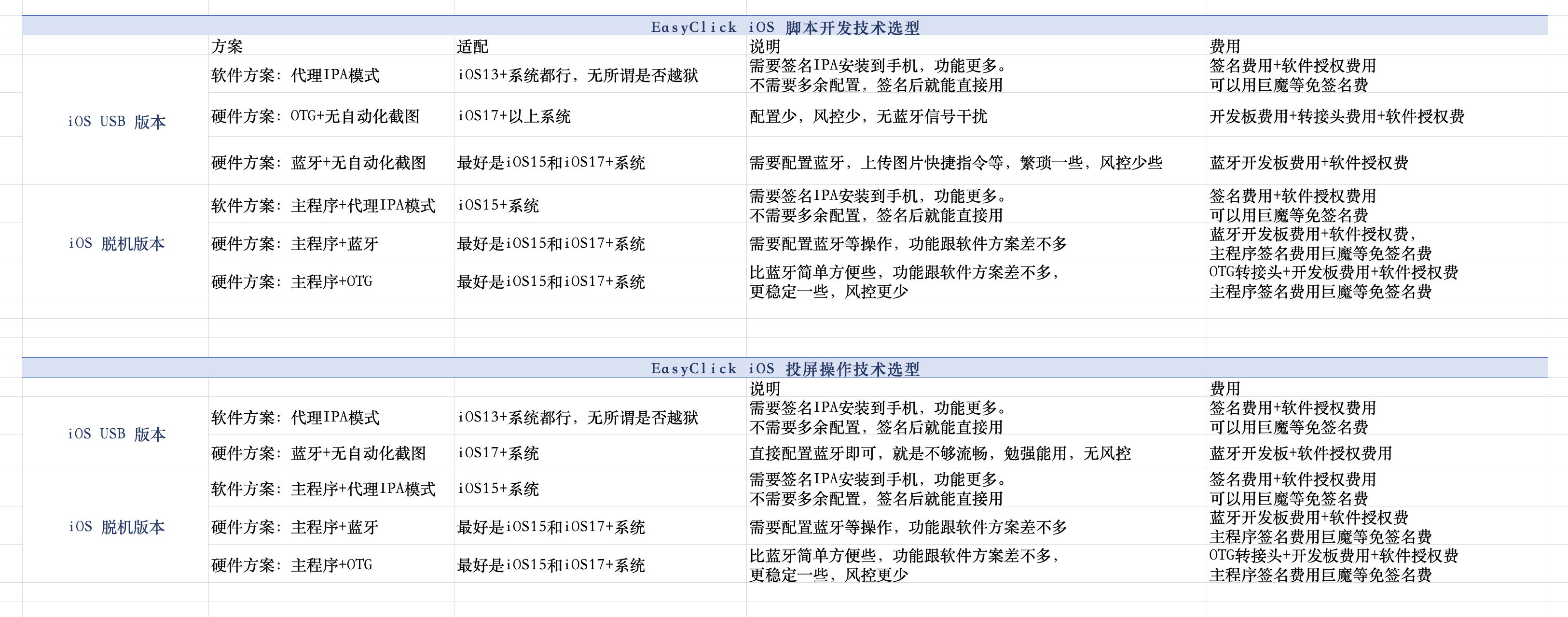
iOS script development — tech selection
iOS USB edition
| Solution type | System requirements | Cost | Advantages | Notes |
|---|---|---|---|---|
| Software: standalone main-app mode | iOS 15+, no jailbreak | IPA signing fee + software license (TrollStore can avoid signing fees) | Full feature set; use directly after signing; custom IME supported; game consoles supported; free personal Apple ID signing via i4Tools/sideloadly also works | — |
| Software: proxy IPA mode | iOS 13+, no jailbreak | IPA signing fee + software license (TrollStore can avoid signing fees) | Rich features; use directly after signing; no extra setup | — |
| Software: AI Agent | Control Center 10.1.0+; PC required | USB device license + LLM tokens (chat/authoring) Running workflows does not consume chat tokens | Little or no code: Chinese chat, drag-and-drop workflows, multi-device batch | Requires USB device license (not screen license); configure proxy IPA or BLE/OTG per steps → AI Agent handbook |
| Hardware: Bluetooth + non-automation screenshots | iOS 17+ No jailbreak | BLE dev board + software license | Lower risk control | Requires BLE setup, upload-image Shortcuts, etc.; more tedious → USB BLE tutorial |
| Hardware: OTG + non-automation screenshots | iOS 17+ No jailbreak | OTG dev board + adapter + software license | No signal interference; lower risk control | Requires upload-image Shortcuts, etc.; more tedious → USB OTG-HID tutorial |
Pick a path by target app (heuristic, same as Android)
- Mainland China apps (WeChat / QQ / Taobao / Douyin / Xiaohongshu, etc.): hardware is usually best — lowest risk control. For iOS USB, prefer BLE; USB OTG setup is tedious and not recommended; when OTG is needed, prefer standalone + OTG/BLE.
- Overseas apps (TikTok / Facebook / Instagram, etc.): try proxy IPA or AI Agent first; switch to hardware if risk control tightens (same: USB → BLE; OTG → standalone combo). Not sure? Use the interactive selector: Tech selector
/selector.
iOS standalone edition
| Solution type | System requirements | Cost | Advantages | Notes |
|---|---|---|---|---|
| Software: main app | iOS 15+ | Signing fee + software license (TrollStore can avoid signing fees) | Single-app setup; fast; only one IPA to sign | — |
| Software: main app + proxy IPA mode | iOS 15+ | Signing fee + software license (TrollStore can avoid signing fees) | Two apps in separate processes; auto-recovery if automation service dies; supports unattended operation | — |
| Hardware: main app + BLE | iOS 17+ | BLE dev board + software license (main app signing can use TrollStore to avoid fees) | Comparable to software options | → BLE getting started |
| Hardware: main app + OTG | iOS 17+ | OTG adapter + dev board + software license (main app signing can use TrollStore to avoid fees) | Simpler and more stable than BLE; lower risk control | → OTG HID getting started |
iOS screen mirroring — tech selection
iOS USB edition
→ See iOS USB screen mirroring tutorial
| Solution type | System requirements | Cost | Advantages | Notes |
|---|---|---|---|---|
| Software: proxy IPA mode | iOS 13+, no jailbreak | IPA signing fee + software license (TrollStore can avoid signing fees) | Use directly after signing; no extra setup | — |
| Hardware: Bluetooth | iOS 17+ | BLE dev board + software license | No risk control issues | Fair smoothness; barely usable |
iOS standalone edition
→ See iOS standalone wireless control-center screen mirroring
| Solution type | System requirements | Cost | Advantages | Notes |
|---|---|---|---|---|
| Software: main app + proxy IPA mode | iOS 15+ | IPA signing fee + software license (TrollStore can avoid signing fees) | Use directly after signing; no extra setup | — |
| Hardware: main app + BLE | iOS 17+ | BLE dev board + software license (main app signing can use TrollStore to avoid fees) | Comparable to software options | — |
| Hardware: main app + OTG | iOS 17+ | OTG adapter + dev board + software license (main app signing can use TrollStore to avoid fees) | Simpler and more stable than BLE; lower risk control | — |
Android tech selection
Android offers six run modes — pick as needed:
Mode overview
| Mode | Activation | Best for |
|---|---|---|
| Accessibility mode | Enable system Accessibility service | General automation; lowest barrier |
| Proxy mode | IDEA activation / activator activation / wireless debugging activation / Shizuku activation, etc. (USB debugging required) | No root; fullest features; recommended default |
| Root mode | Rooted device | System-level Shell operations |
| USB-HID mode | PC runs HID control center + USB cable | PC-direct control; large-scale multi-device |
| BLE mode | ESP32 BLE dev board | Hardware path when Accessibility cannot be enabled |
| OTG HID mode | ESP32 dev board + OTG adapter | Most portable hardware; no PC needed |
Pick a path by target app (heuristic)
- Mainland China apps (WeChat / QQ / Taobao / Douyin / Xiaohongshu, etc.): HID (OTG / BLE / USB-HID) is usually best — lowest risk control.
- Overseas apps (TikTok / Facebook / Instagram, etc.): try proxy mode first; switch to HID if risk control tightens. Not sure? Use the interactive selector: Tech selector
/selector.
Feature compatibility quick reference
| Feature | Accessibility | Proxy | Root | USB-HID | BLE | OTG HID |
|---|---|---|---|---|---|---|
| Node selector | ✅ | ✅ | ❌ | ❌ | ❌ | ❌ |
| Image/color recognition | ✅ | ✅ | ✅ | ✅ | ✅ | ✅ |
| OCR | ✅ | ✅ | ✅ | ✅ | ✅ | ✅ |
| YOLO detection | ✅ | ✅ | ✅ | ✅ | ✅ | ✅ |
| Shell commands (normal) | ✅ | ✅ | ✅ | ✅ | ✅ | ✅ |
| Shell commands (elevated) | ❌ | ✅ | ✅ | ❌ | ❌ | ❌ |
| System keys | ✅ | ✅ | ✅ | ✅ | ✅ | ✅ |
Mode details
Accessibility mode
| Item | Details |
|---|---|
| System requirements | Android 5.0+, no root |
| Hardware | None |
| Cost | Packaging membership only |
| Advantages | Lowest barrier — enable Accessibility and go; supports node selector |
| Limitations | Screenshots need explicit permission; fewer features than proxy mode |
| Docs | Accessibility event API |
Proxy mode (recommended default)
| Item | Details |
|---|---|
| System requirements | Android 5.0+, USB debugging, no root |
| Hardware | None (PC needed for first activation) |
| Cost | Packaging membership only |
| Advantages | Fullest features; screenshots without per-use permission; Shell commands; IME control; runs with screen off |
| Limitations | First activation needs PC; after USB disconnect, configure ADB WiFi to stay active |
| Docs | Proxy event API | Device activation |
Root mode
| Item | Details |
|---|---|
| System requirements | Android 5.0+, rooted |
| Hardware | None |
| Cost | Packaging membership only |
| Advantages | Arbitrary Shell commands; strong system-level control |
| Limitations | No node selector; requires root |
| Docs | Shell command API |
USB-HID mode
| Item | Details |
|---|---|
| System requirements | Android 5.0+, no root |
| Hardware | PC (Windows/Linux); USB cable; optional HID mini host (v3.0.0+, driverless) |
| Cost | HID hardware (optional) + packaging membership |
| Advantages | PC controls phone over USB — stable; multi-host networking for large-scale control |
| Limitations | No node selector; Windows needs libusbK/WinUSB (v4.0.0+ supports WinUSB); PC must stay connected |
| Docs | HID event API | USB-HID hardware guide |
BLE mode
| Item | Details |
|---|---|
| System requirements | Android 5.0+, no root |
| Hardware | ESP32-S3 or ESP32-C3 dev board |
| Cost | BLE dev board (low tens of CNY) + packaging membership |
| Advantages | Wireless; lower risk control; no signal interference |
| Limitations | No node selector; BLE pairing; location/floating-window permissions |
| Docs | BLE event API | BLE hardware guide |
OTG HID mode
| Item | Details |
|---|---|
| System requirements | Android 5.0+, OTG support, no root |
| Hardware | ESP32-S2 or ESP32-S3; OTG adapter/cable (3-in-1 with charging recommended) |
| Cost | OTG dev board (low tens of CNY) + adapter + packaging membership |
| Advantages | Most portable; no PC or network; lowest risk control; more stable than BLE |
| Limitations | No node selector; first use needs USB accessory authorization on phone |
| Docs | OTG event API | OTG HID hardware guide |
Android screen mirroring — tech selection
Android mirroring has screen data transfer and tap injection — combine freely. Screen data goes over USB or WiFi/network; taps use software (ADB / Accessibility / proxy) or hardware (HID).
First 10 devices free; extra devices need license codes. See Enterprise Android control-center mirroring.
Software options
| Option | Screen transfer | Tap injection | System/network | Hardware | Stability |
|---|---|---|---|---|---|
| USB ADB mirroring | USB cable | ADB | USB debugging required | USB cable | Highest |
| ADB WiFi mirroring | WiFi (LAN) | ADB | Network debugging after first USB pair | None | High |
| LAN WiFi mirroring | WiFi (LAN) | Accessibility / proxy | EC APK installed; same LAN | None | High |
| WAN mirroring | Internet | Accessibility / proxy | Public IP (port forward) or cloud tunnel | Cloud server (optional) | Network-dependent |
Hardware options (HID)
HID tap injection — no Accessibility, no USB debugging — lower risk control. Screen data still over WiFi.
| Option | Screen transfer | Tap injection | Hardware | Cost per device | Notes |
|---|---|---|---|---|---|
| USB-HID mirroring | WiFi / Internet | USB HID host | PC or mini host (e.g. Centerm C92) | ~¥150/device (up to 20 phones) | Large-scale control; multi-host networking |
| BLE HID mirroring | WiFi | BLE HID | ESP32-S3 / C3 | Low tens of CNY | Wireless; no signal interference |
| OTG HID mirroring | WiFi | OTG USB HID | ESP32-S2 / S3 + OTG adapter | Low tens of CNY + adapter | Simplest setup; fastest response; no PC |
→ See Control-center mirroring | HID Linux host | USB-HID guide | BLE guide | OTG guide
HarmonyOS Next solution selection
HarmonyOS Next uses control-center connection (nothing installed on device; risk-friendly). PC and phone connect via USB wired or WiFi wireless debugging — cable not required at all times. Current options:
| Solution type | System / environment | Cost | Advantages | Notes |
|---|---|---|---|---|
| Default (USB wired / WiFi wireless) | HarmonyOS Next; PC and phone on same network or USB | Per docs and licensing | No on-device install; wired debugging, or enable wireless debugging and unplug | Enable wireless debugging in Developer options; center Scan wireless devices with IP:port; or USB first, then Enable wireless debugging and switch to wireless → Connect phone (USB / wireless) | HarmonyOS docs home |
| Hardware: USB BLE | HarmonyOS Next USB center 3.2.0+; ESP32-C3 / S3 dev board | BLE dev board (self-purchase) + software licensing | BLE HID injection; combine or use alone with HDC automation / mirroring / USB HID | Flash HarmonyOS USB BLE firmware (not iOS firmware); center binds UDID ↔ bleMac then pair on phone; dev board can also use serial or WiFi → BLE tutorial | BLE event API |
Selection tips
- Most workloads: default connection (USB or WiFi wireless debugging) is enough.
- For flexible hardware taps / key injection, or combining with existing HID: USB BLE. Not sure? Use the interactive selector: Tech selector
/selector.